



ConnectWise PSA Connector
ConnectWise PSA Connector
Take the manual work out of fulfillment
The ConnectWise PSA Connector from TD SYNNEX transforms how IT providers handle procurement. It embeds real-time inventory, pricing, order creation and status updates inside the ConnectWise workflows your team already uses. No more duplicate entries. No more switching between systems. Just streamlined operations and full visibility, right where you need it. This connector gives you full control; it’s built for flexibility, so your process works the way you want it to.
What you can do
The Connector Bridge integrates directly with ConnectWise PSA, enabling key procurement actions within your existing workflows:

Look up products in real-time
View live pricing, availability and even promotions

Convert sales to orders
Triggered manually or automatically, based on your rules

Sync order data automatically
Keep order status, shipping and invoice details up to date in PSA
Connect TD SYNNEX to your PSA in minutes
The TD SYNNEX ConnectWise PSA Connector is powered by the TD SYNNEX Digital Bridge — a secure, cloud-based integration layer that links your PSA directly to TD SYNNEX’s systems.
Using the Connector Bridge portal, you can:
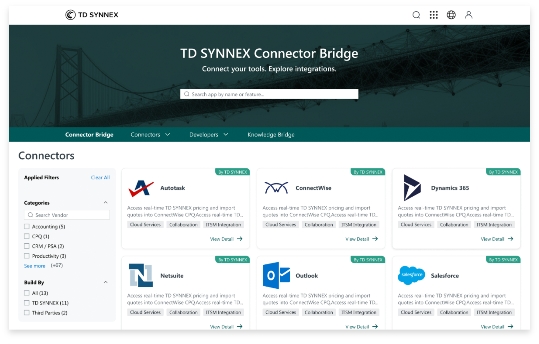
Step 1: Find the Connector
Use the search and filter tools on the Connector Bridge homepage to quickly locate ConnectWise PSA. You can filter by category or type the name directly into the search.
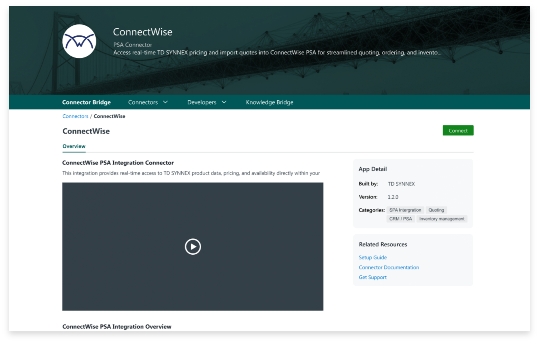
Step 2: Review the Connector Overview
Click on the ConnectWise PSA connector to see app details, setup steps and helpful resources like videos and how-to guides. Then click Connect to get started.
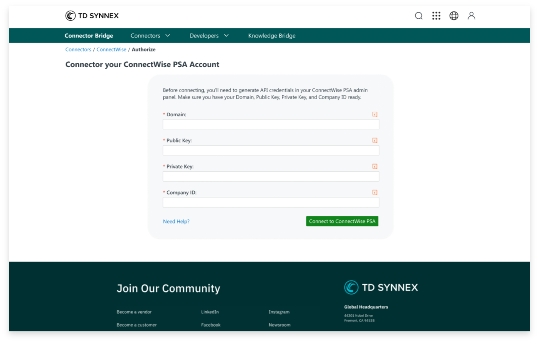
Step 3: Connect your PSA Account
You’ll be prompted to enter your domain, public key, private key and company ID to securely connect your ConnectWise PSA account. Click Connect to ConnectWise PSA to confirm.
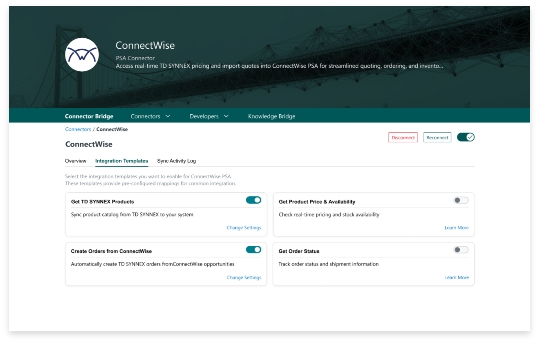
Step 4: Choose Integration Templates
Once connected, choose which templates you’d like to sync — such as product catalog, real-time pricing and availability, order creation and order status updates. You can enable or disable each option individually.
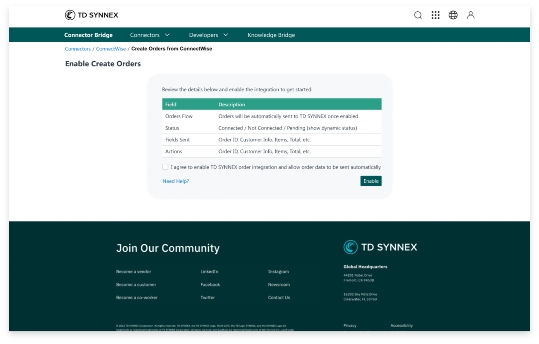
Step 5: Enable Order Creation
Turn on the Create Orders Automatically toggle to allow the system to generate and send orders from synced data without manual intervention.
Step 6: Select Product Categories
Choose which product categories you’d like to sync with your ConnectWise PSA system. You can select multiple categories or filter by your business needs.
Step 7: Monitor Sync Activity
Use the activity log to track the status of your integrations. View synced data, activity history, current status, and any errors to stay informed at every step.
Features that empower your productivity
Check price and availability instantly
Search for SKUs and see up-to-date pricing, stock levels and deals all without leaving ConnectWise.
Submit orders with precision
Send purchase orders to TD SYNNEX directly from ConnectWise. Submit manually or automate based on workflow rules so the system works the way your team needs.
Track orders without the follow-up
Status updates, shipment tracking and invoice details sync right into your PSA.
Why teams love it
Cuts out the
copy-paste.
Manual order entry slows everything down. This connector automates what matters, without adding complexity.
Turns your PSA into your control center.
Stop toggling between tabs. See what’s in stock, send POs, and track orders — all from one place.
Gives you automation that respects your workflow.
You stay in control of what gets sent, when and how. No one-size-fits-all setup.
Get started today
Make ConnectWise PSA your single source of truth for fulfillment, with real-time data and automation from TD SYNNEX Digital Bridge.
