



Introducing the Windows 365 Link
The simple, secure, purpose-built device for Windows 365

Download our data sheet to learn more.
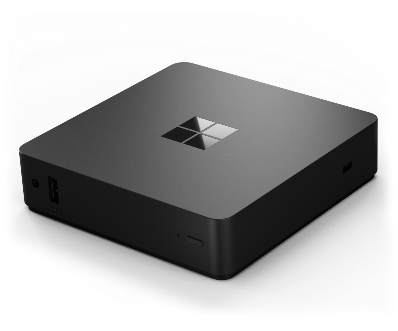
The first cloud PC device purpose-built by Microsoft to connect securely to Windows 365 in seconds
Benefits:
Cloud-powered performance
Maximize productivity with cloud PC devices that connect in seconds to Windows 365 and offer responsive, high-fidelity experiences.
Secure by
design
Reduce your attack surface with cloud PC devices that have no local data, admin-less users and password-less authentication using Microsoft Entra ID.
Simplified IT
management
Efficiently configure Windows 365 Link within minutes and manage it alongside other PCs using Microsoft Intune.
Aligned with sustainability goals
Windows 365 Link contains a minimum of 63% recycled content, is an ENERGY STAR-certified device and is designed to be long-lasting.
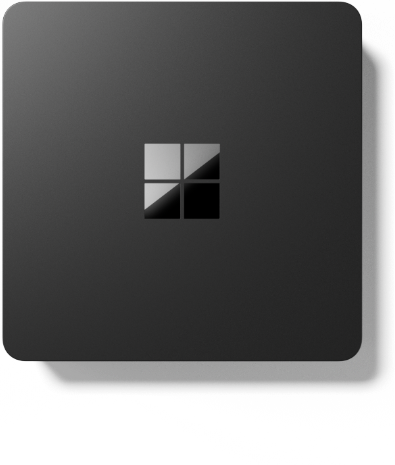
Windows 365 Link supporting accessories
Wireless support
- Wi-Fi 6E
- Bluetooth 5.3
Connections (ports)
Windows 365 Link has the following ports:
Front panel
- USB-A (USB 3.2 Gen 1, 2.5W)
- 3.5mm audio jack
- Power button and LED indicator
Side panel
- Kensington lock to physically secure the device
Back panel
- USB-C (USB 3.2 with DP 1.4 Alt Mode, 7.5W)
- DisplayPort (1.4a, up to 4K60)
- HDMI (2.0b, up to 4K60)
- Ethernet (1.0Gbit/s)
- Power supply (barrel type, 65W)
- Unified extensible firmware interface (UEFI) pin hole
Bottom
The bottom of the device supports Video Electronics Standards Association (VESA) 100 pattern.
Monitor support
HDMI, DisplayPort and Type C can support monitors up to 4K in resolution (two 4K monitors maximum).
Peripheral support
USB and Bluetooth support for:
- Keyboard
- Mouse
- Headphones
- Camera
- FIDO2 passkeys
- USB
- Near-field communication (NFC) (requires compatible NFC reader)
For more information, see Tested peripherals for Windows 365 Link devices.
Processor
- Intel Processor N250
Memory
- Eight-GB LPDDR5
Storage
- 64GB universal flash storage (UFS)
Software
Windows 365 Link comes pre-installed with the Windows CPC operating system (OS), purpose-built to connect users directly to Windows 365 cloud PCs.
Requirements for
Windows 365 Link include:
- Windows 365 license for your cloud PC
- Management by your organization using Microsoft Intune
Security features
- Discrete Trusted Platform Model 2.0
- Secure boot
- Virtualization-based security
- Hypervisor-protected code integrity
- BitLocker drive encryption
- Strict application control policy
- No local user with administrative rights
- No local data storage
- No local apps
- Security baseline policies are enabled by default
- Microsoft Defender EDR Sensor
Accessibility
Windows 365 Link adheres to Microsoft’s accessibility standards, supporting features such as Narrator, Magnifier, Contrast themes, on-screen keyboard, Sticky keys, Voice Access and Filter keys.
Built with sustainability in mind
Windows 365 Link is designed with sustainability in mind
Warranty and protection plans
Windows 365 Link comes with a Microsoft Limited Hardware Warranty that includes a minimum of one year of coverage for mechanical breakdown.
Customers who want to protect their investment beyond the hardware warranty can purchase a protection plan.
If the device is no longer covered by the Microsoft Limited Hardware Warranty or a protection plan, customers may be eligible for out-of-warranty services for a fee.
Customer stories
“We needed a purpose-built device on the shop floor that could fit our new, collaborative approach. Windows 365 Link devices were exactly the solution we envisioned to enable our workers to access their assets in the cloud.”
- Roman Kleyn,
Head of Workplace Design, Krones
“Windows 365 Link provides secure access to cloud desktops, transforming hardware-dependent services into agile, cloud-based solutions. In shared environments, it offers a low-cost alternative without sacrificing user experience. In retail, it will boost security, supporting a zero-trust model that safeguards critical customer systems while removing friction.”
- Matt Harkness,
Product Manager — Modern Workplace, One NZ
“At Phoenix, we empower our customers to transform their workplaces with modern end-user computing solutions like Microsoft Intune and Windows cloud services. And now, Windows 365 Link can offer them the first cloud PC device as a secure option for their endpoint strategy, connecting their users to Windows 365 in seconds and keeping management simple for IT teams.”
- Daniel Bowker,
Cloud Endpoint Solutions Lead, Phoenix
